Volunteers Are Wearing Giant QR Codes in the Pick-up Line—and Parents Are Actually Scanning Them
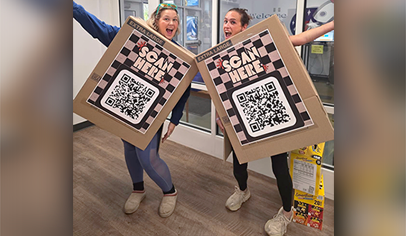
PTOs are taking the wearable QR code trend straight to the pick-up line and getting parents to sign up, donate, volunteer, and more, right on the spot. Use our free giant QR code template to customize one for your school!


If you've spent any time around a school pick-up line lately, you may have noticed something new...PTO volunteers walking around with giant QR codes strapped to their bodies. It looks a little something like this:
They're wearing QR codes on sandwich boards, taping them to cardboard boxes, turning them into full-on themed costumes to promote school events and fundraisers, and putting themselves directly in front of the parents they're trying to reach. And honestly? It's kind of brilliant. Parents don't have to remember to dig through their email or recover the crumpled-up flyer they found in the backpack three days ago...and then lost. The giant QR code is right there, asking to be scanned. I mean, how can you *not* smile and happily scan a parent who's enthusiastically working the pick-up line dressed as giant, walking QR code, while you sit in your car, doom scrolling (the guilt!)? Basically impossible.
PTOs and PTAs are using the brilliant guerilla marketing tactic to promote everything from volunteer signups and fundraisers to event registration and membership drives. Here's how to steal the idea for your school - plus make your own wearable QR code sign using our 18" x 24" giant QR code sign Canva template. Just add your text and QR code, and you're ready to go!
What Can Your PTO Promote With a Giant QR Code?
The short answer: pretty much anything your PTO wants parents to do online! The trick is to connect the QR code to one specific action and make it easy for parents to take that action on the spot. Here are a few ideas to get you started!
Recruit volunteers. Need volunteers for book fair, the fun run, carnival, or teacher appreciation week? Wear a QR code that links directly to your volunteer signup. Add a message like, You can't outrun the PTO! Scan to help out with the fun run.
Get families to join the PTO. Kick off your membership drive with a volunteer sporting a giant QR code and a sign that reads Our school needs YOU! Link to your membership form or a page explaining how families can get involved.
Promote a fundraiser or get parents to donate. Whether you're selling spirit wear, collecting donations, or running a restaurant fundraiser, make it easy for parents to participate without having to hunt down an order form or remember to come back to it later. Try Scan to participate! Or, for to promote a spirit wear sale: I'd rather be wearing a school T-shirt! Scan to order yours!
Boost event registration and ticket sales. Carnival, bingo night, the school dance, a fun run—if families need to register or buy tickets, a giant QR code can point them straight to the signup page. Bonus points for wearing it during morning drop-off or afternoon pickup when you're already reaching a captive audience. For example, Skip the car line! Scan to buy a ticket!
Get feedback from families. Want parents to complete a quick survey, vote on a spirit wear design, or share ideas for next year's events? A QR code makes the ask simple. Keep the message short:
Collect donations or wish list items. Link to a teacher wish list, a teacher appreciation signup, or a donation page for a specific school project. Make it clear what the support will help fund or provide.
Don't Overlook the School Pick-up Line
While you can wear a QR code anywhere, the school pick-up line is practically made for this idea. Parents are already captive waiting in their cars, and a volunteer with a giant QR code (possibly dancing? maybe giving high fives?) can turn that otherwise boring stretch of time into an opportunity to connect with the PTO.
First, make sure you get the idea approved by your school administrators - and don't interfere with traffic, supervision, or dismissal procedures. Volunteers should approach parked or waiting families only when it's safe to do so, and never encourage drivers to scan their phones while moving.
How to Make a Giant QR Code for Your PTO
Ready to become a walking call to action? (File that under things you didn't know you'd be doing when you joined the PTO.) You don't need fancy equipment or design skills to make a life size QR code. You can create a QR code for free and use our free Canva template (sized for an 18" x 24" sign) to design a sign that's ready to print.
Step 1: Decide where you want the QR code to go
Before you make the code, choose the exact webpage or form you want parents to visit. It could be a volunteer signup, fundraiser order form, event registration page, donation link, or membership form.
Make it easy on parents: Link directly to the action instead of sending them to your PTO homepage and asking them to find their own way.
Step 2: Generate a QR code for free
Canva offers a free QR code generator. You can also use another reputable free QR code generator (like QR Code Monkey) if you prefer.
-
Enter the URL you want the code to open.
-
Generate your QR code.
-
Download the code and add it to your Canva design (use our free Canva template).
A static QR code is generally sufficient when you're linking to a fixed URL. If you use a dynamic QR code service, check whether ongoing access or editing features require a paid plan.
A tip: Always, always test your QR code with a phone before you print anything! Make sure it opens the correct web page and doesn't require parents to log in to an account they may not have.
Step 3: Make the QR code BIG in Canva
For a wearable QR code, bigger is better. A code that's easy to scan from a few feet away is much more useful than one that requires parents to get right up next to you. Use our free Canva to create your customized QR code sign:
-
Open our free Canva template (pre-sized for 18" x 24" - the perfect size to adhere to the face of a large and extra large cardboard box).
-
Custom the sign with your text and a short call to action.
-
Upload your QR code or add the code you generated in Canva.
- Download your finished design as a print-ready PDF, or use the file format requested by your print shop.
A few design tips:
-
Use a high-contrast design. Black QR code on a white background is a reliable choice.
-
Leave a clear margin of blank space around the QR code.
-
Keep text and decorative elements away from the code itself.
-
Avoid stretching, cropping, or distorting the QR code.
-
Don't make the message too wordy. Parents should know what they're scanning for at a glance.
Step 4: Print it—and find a way to wear it
You have options here, depending on your budget and how ambitious and creative your volunteer is feeling (LOL).
The sandwich board: Print your design on sturdy board or have it mounted on a wearable sandwich board. This is a great option for volunteers who want to walk around during pickup or school events.
The cardboard box: Grab a standard large cardboard moving box—about 18 × 18 × 24 inches—big enough to make your QR code impossible to miss without being so huge that you can't carry it. You can find large and extra large moving boxes for just a few dollars at places like U-Haul, Lowe's, or Home Depot). Attach your large printed QR code to the front of the cardboard box, cut out comfortable openings for arms, and turn yourself into a human billboard.
The poster board: Mount your design on foam board or another lightweight material and carry it around school events. It's simple, inexpensive, and easy to store afterward.
The full costume: For the volunteer who loves a little extra attention, turn the QR code into a costume for a spirit day, fundraiser kickoff, or to promote a themed school family event. Keep the code flat and unobstructed so it can still be scanned.
Your car: Turn the QR code into a decal for the back window of your car. It's best if this is used for an ongoing campaign or message, like "Support our school's PTO".
If you're printing at home, check your printer's maximum paper size. For larger designs, you may need to use a print shop or print the design across multiple sheets and assemble them.
Step 5: Test it before the big debut
Don't skip this part! Scan the finished, printed code from several feet away. Try it at the distance a parent would be standing or sitting in a car, and test it in the lighting conditions where you'll use it. If it doesn't scan quickly, make the code larger, improve the contrast, or simplify the design. A giant QR code that doesn't work is just a giant square.
Make Your PTO's Message Impossible to Miss
The QR code gets parents' attention, but the message tells them why they should scan it. Keep the wording short, specific, and action-oriented. A few ideas to customize your sign for your PTO's campaign:
-
SCAN TO VOLUNTEER
-
SCAN TO JOIN THE PTO
-
SCAN TO BUY TICKETS
-
SCAN TO SUPPORT OUR SCHOOL
-
SCAN TO ENTER TO WIN
-
SCAN TO SHOP SPIRIT WEAR
-
SCAN TO DONATE
You can also add a little humor or school spirit. Think "I'm wearing this so you don't have to find the flyer you lost".
And remember: The link should take parents directly to the signup, purchase, or form promised by the sign. The fewer clicks between the scan and the action, the better.
One Last Thing: Give Parents a Little Space
A giant QR code is a fun way to start a conversation, but the goal is to make participation easier, not make parents feel cornered by a walking billboard. Let families scan if they're interested, keep the interaction light and friendly, and wave.
And remember, the best part of this idea isn't the cardboard costume or the giant code. It's finding a creative way to connect with families who want to help but might otherwise miss the message. If all it takes is a PTO volunteer dressed like a walking QR code to get someone to sign up for a shift? Winning. 🙌
What kind of creative parent engagement tactics have worked for your PTO? Tag @ptotoday on social so we can see!